
What is an AI customer service knowledge base? Let your LINE Official Account answer common questions automatically
“What time do you close?” “Can I bring kids?” “Any discounts for paying by card?” If you run a LINE Official Account, you probably copy and paste these answers every day. The idea of an AI customer service knowledge base is simple: organize the answers and hand them to AI, and let it answer for you 24 hours a day. This article explains how it works, how to prepare your knowledge, and how to keep improving it after launch.
How does an AI knowledge base work?
Technically this is called RAG (retrieval-augmented generation). The process is:
- Retrieval: when a customer asks something, the system uses semantic matching (not literal matching) to find the few most relevant pieces of knowledge in the knowledge base
- Generation: AI writes an answer in a natural tone based on the knowledge it found
The key difference is meaning. Traditional keyword replies only recognize the exact words you set, while semantic search understands that “What time do you close?”, “How late are you open?” and “Are you still open now?” are the same question. So you don’t need to list every way of asking; you just need to organize the answers.
Step 1: Prepare your knowledge
In Chatbotta’s Knowledge, knowledge comes from three sources:
- Upload files: upload your existing FAQs, product information and policies (PDF/TXT/DOCX) directly, and AI automatically splits them into Q&A pairs
- Enter manually: enter Q&A pairs one at a time, good for filling in scattered knowledge
- Extract from conversations: pull Q&A out of your staff’s conversations in the inbox. This is the most overlooked yet most valuable source, because these are the questions customers actually ask
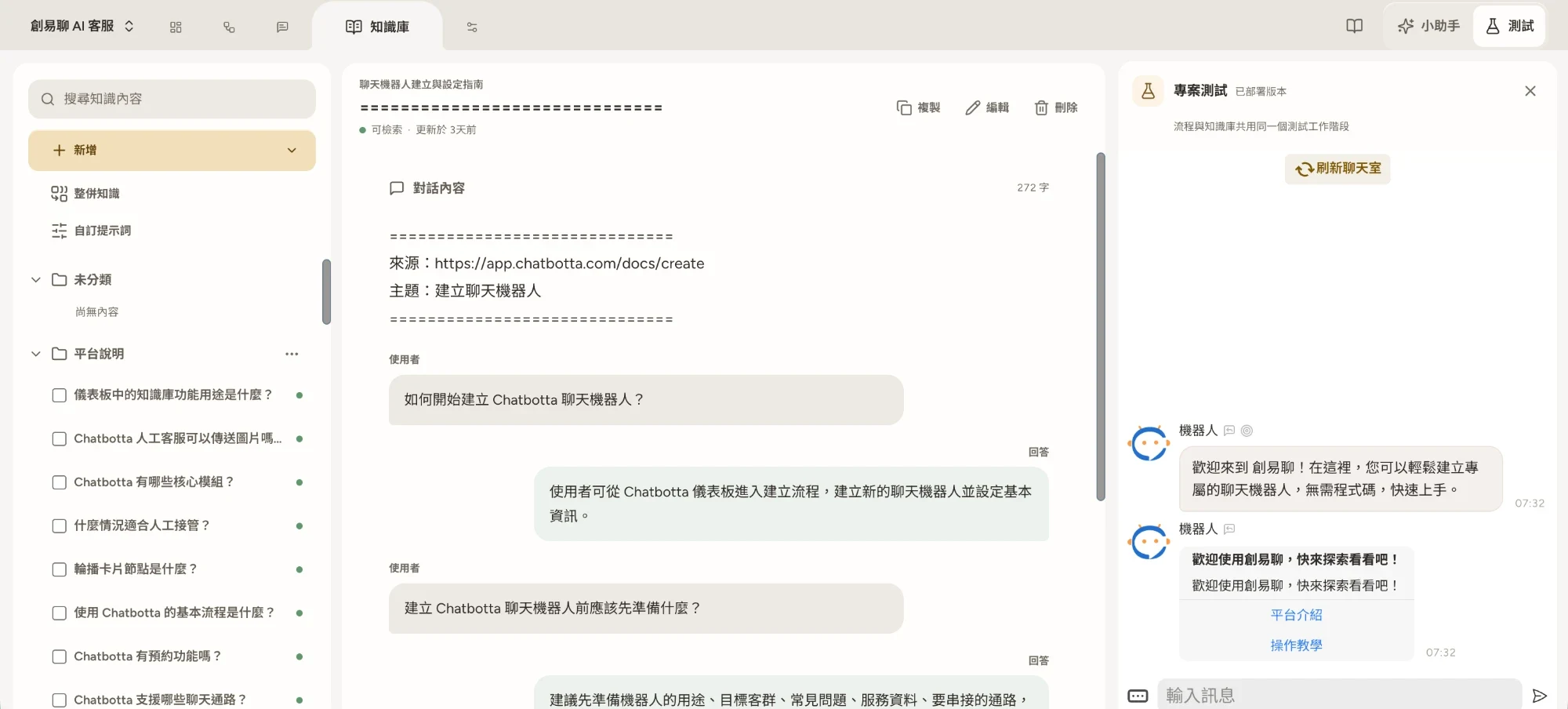
Step 2: Organize and remove duplicates
As a knowledge base grows, duplicates and contradictions are the biggest threat to answer quality. Before launch, do two things:
- Sort automatically: use folders to group knowledge by topic so it’s easy to maintain
- Merge similar knowledge: let the system find items with similar meanings and flag conflicting content (for example, two items listing different opening hours), then merge them in one click after you confirm
Step 3: Test and correct
Once knowledge is saved, customers on every channel get it right away. Open “Test” on the right and play your pickiest customer: rephrase questions, ask vague ones, ask about things that aren’t in the knowledge base. If an answer isn’t good, edit the knowledge directly, and customers get the fix right away. Adjust the bot’s tone in “Bot persona” (for example, always using your brand’s form of address), and set how to handle specific situations in “Reply rules” (for example, adding a booking link when customers ask about prices).
Step 4: Keep improving with data
Launch isn’t the finish line. Two habits make your bot smarter over time:
- Check hit counts: every piece of knowledge has a count of how often lookups found it. Topics with many hits are what customers ask about often and are worth writing more fully; knowledge that has never been hit may be worded too narrowly and needs rewriting
- Keep extracting knowledge from conversations: each time your staff answer a new question, extract it into the knowledge base (you can also turn on automatic extraction), so next time the same question doesn’t need a manual reply
Which questions should you leave to people?
An AI knowledge base is suited to questions that have a standard answer. For complaints, price negotiations and complex individual cases, it’s best to hand off to a person directly: add a “Hand off to a person” step to your flow, or let staff take over the conversation in Chats at any time. Good automation doesn’t replace people; it saves their time for the conversations that truly need a person.
FAQ
Q: How is an AI knowledge base different from traditional keyword replies?
A: Keyword replies match the literal words, so they fail as soon as a customer phrases things differently. An AI knowledge base uses semantic search: it understands what the question means, finds the most relevant knowledge and answers from it, so it handles all the different ways of asking the same question.
Q: How much content does a knowledge base need?
A: Starting with your 20–30 most frequently asked questions already makes a noticeable difference. After that, extracting knowledge from conversations keeps adding your staff’s answers to the knowledge base, so coverage keeps growing.
Q: Will the AI make up answers?
A: A knowledge-based AI customer service bases its answers on the knowledge you provide, and you can set it to hand questions it isn’t sure about to a person. With lookup hit counts and the test chat, you can keep checking and correcting answer quality.