
Chatbot platform migration guide: switch without interrupting service
You’ve used a chatbot platform for a while, and it’s starting to fall short, or the fees feel less and less worth it. You want to switch but are afraid to: afraid of losing friends, missing customer messages, or wasting everything you’ve set up. The short answer: switching platforms is safer than you think. Your friend list is on your LINE Official Account, and switching platforms only changes one connection. What really takes care is taking stock before you move and the details at the moment you switch. This guide breaks down the whole process.
When should you consider switching platforms?
A platform falling short doesn’t automatically mean you should move; moving has a cost. But if you see these signs, it’s worth a serious look:
- You’ve outgrown its features: you need modules (such as bookings inside LINE or an AI knowledge base) your current platform doesn’t have, so you’re patching things together with outside tools
- The pricing doesn’t fit: as your friends or message volume grew, the monthly fee jumped several tiers, but the features you actually use didn’t change (for how costs add up, see AI customer service costs explained)
- It doesn’t understand customers: the platform only matches keywords, so it can’t answer when customers phrase things differently, and your staff still answer the same questions every day
- Maintenance takes too much staff time: every answer change means rebuilding a flow, and without a dedicated person you can’t keep it up
Before you move, understand the most important thing
What many owners fear most is that switching platforms will reset their friend count to zero. The answer is it won’t. Your friends added your LINE Official Account, and the list is stored on LINE’s side. The chatbot platform only connects behind your Official Account through the Messaging API webhook to reply to messages for you. Switching platforms simply means pointing the webhook from platform A to platform B. Your Official Account, friends, add-friend link and QR code all stay exactly as they are.
Pre-migration checklist
- Collect the keyword list and auto-reply content from your current platform (screenshots or an export)
- Export your customer list, tags and important conversations: these are platform data and usually can’t be recovered after you cancel
- Make sure you have admin access to LINE Developers (some agencies create the channel under their own account, so get access back first)
- Note your current rich menu and greeting message settings, which you’ll rebuild on the new platform
- Check for running campaigns or scheduled broadcasts and avoid switching while they run
Four steps to migrate
Step 1: Take stock of your keywords, scripts and common questions
Put all the keyword replies and conversation scripts from your old platform into one document, then add the questions your staff actually answer most often (look through the past month of conversations). This list is the raw material for the new platform’s knowledge base. Moving is also a great chance to turn replies scattered everywhere into an organized body of knowledge.
Step 2: Rebuild your knowledge base and flows on the new platform, and check them in the test chat
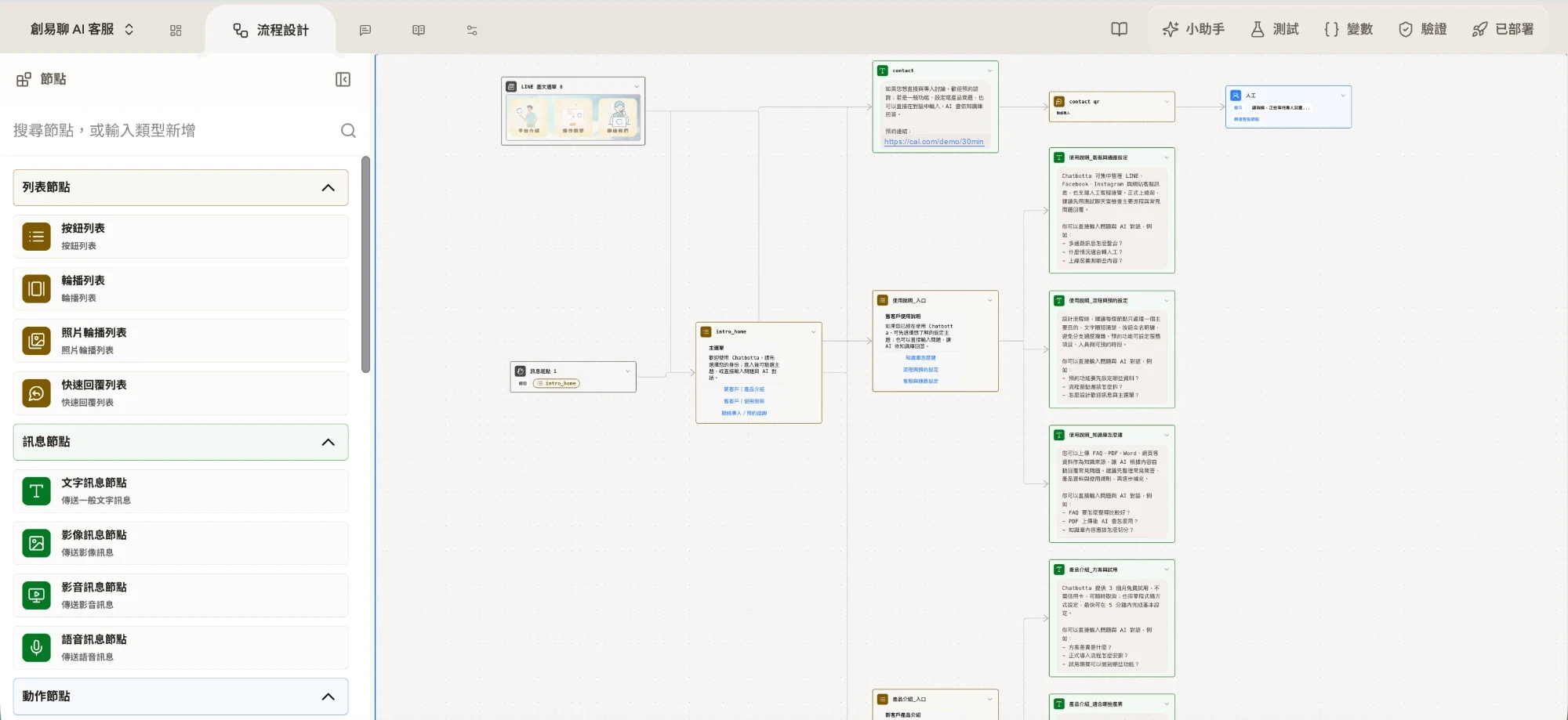
Taking Chatbotta as an example: upload your organized Q&A document (PDF/DOCX supported) to the AI knowledge base, and the system automatically splits it into Q&A pairs. Then rebuild your menus and interactive flows on the visual flow canvas (or describe what you need to Copilot and let it lay out the steps for you). The key point: this stage doesn’t affect your live service at all. Your old platform keeps running as usual, and you use the built-in “Test” on the new platform to go through all your common questions, making sure the answers are accurate before moving on. For setting up a project, see Creating a chatbot.
Step 3: Switch the Channel access token / webhook
The actual “move” happens in these few minutes: paste your LINE Official Account’s Channel access token into the new platform. Once connected, the webhook points to the new platform and the new bot starts replying to messages. When you switch:
- Pick an off-peak time (for example, after closing) to keep any impact to a minimum
- Make sure the LINE Official Account’s response settings use chatbot mode and the webhook is turned on
- Right after switching, send a few messages from your own LINE to confirm the new bot replies normally
- Make sure the old platform’s connection is disabled so the two don’t compete to reply
Step 4: Monitor for a week, keep people ready to take over
The first week after launch matters most. Check the knowledge base hit counts every day and add knowledge for questions it answered poorly. At the same time, use hand-off to a person in the shared inbox: staff can take over conversations the bot can’t handle at any time, then hand them back to the bot when done. This is the final safeguard against interrupting service.
Common concerns, answered
| Concern | What actually happens |
|---|---|
| Will I lose friends? | No. Friends are tied to your LINE Official Account; switching platforms only changes the webhook |
| Can I move chat history? | Usually not. Chat history is each platform’s own data, so export a backup before you cancel |
| Can I move tags and segments? | They need to be rebuilt on the new platform. Export your list with its tags first, then tag again after moving |
| How long will service be interrupted? | The switch itself takes only a few minutes; as long as the new platform is built and tested beforehand, customers will barely notice |
Don’t want to move it yourself? We can help
If the process still seems complicated, Chatbotta offers hands-on onboarding help: from taking stock of your old platform’s content, building your knowledge base and flows, and switching the connection, to monitoring and adjusting after launch, someone walks you through it all. The free trial is 14 days and can be extended depending on your onboarding progress. You can book a 30-minute product demo to evaluate it first, or sign up and start building right away. You’re also welcome to add our official LINE account and ask us directly. If you’re still deciding which platform to move to, read LINE chatbot recommendations and comparison first.
FAQ
Q: If I switch chatbot platforms, will I lose my LINE friends?
A: No. Your friend list lives in your LINE Official Account; the chatbot platform only connects behind it through a webhook. Switching platforms just changes that connection, and your Official Account and friends are not affected at all.
Q: Can I move my chat history from the old platform?
A: Usually not. Chat history is stored in each platform’s own database as platform data, and platforms generally don’t offer a way to transfer it to another platform. Before you cancel, export and back up important conversations and customer data.
Q: Will customer messages be missed while I switch the webhook?
A: The switch itself takes only a few minutes, and any messages that arrive during it go to whichever platform the webhook points to at that moment. Switch during off-peak hours, build and test your flows and knowledge base on the new platform beforehand, and test with your own account right after switching, and the risk of missed messages is very low.
Q: I don’t know how to do this myself. Can someone help me move?
A: Yes. Chatbotta offers hands-on onboarding help, including organizing your common questions, building your knowledge base and conversation flows, switching the connection, and monitoring and adjusting after launch. The free trial is 14 days and can be extended depending on your onboarding progress. You can start by booking a product demo.