
Choosing AI customer service for lodging: 5 things to check, plus a B&B LINE auto-reply guide
People who run a B&B or small hotel almost all live the same life: cleaning rooms and picking up guests by day, and still answering “Any rooms left this Saturday?” or “Can we add a bed for the baby?” at 11 p.m. Lodging questions always pour in when you’re busiest, and most of them are repeats. This article shows you how to use a LINE Official Account with AI auto-replies to hire yourself a 24-hour concierge.
A day of messages in lodging: guests are awake while you’re busy
- Booking questions late at night: guests usually plan trips on their phones after work or before bed, so questions peak from 10 p.m. to the early hours. Reply the next morning, and they may have booked elsewhere
- Peak seasons and long weekends: in summer and before Lunar New Year, dozens of the same questions arrive in a day
- No time to reply during housekeeping: cleaning, restocking and pick-ups keep your hands full, so LINE keeps pinging while you set it aside
Leave these messages unanswered and you lose bookings; answer them yourself and your whole day gets chopped up. Questions with fixed answers can all go to the system.
Which questions can the AI knowledge base answer?
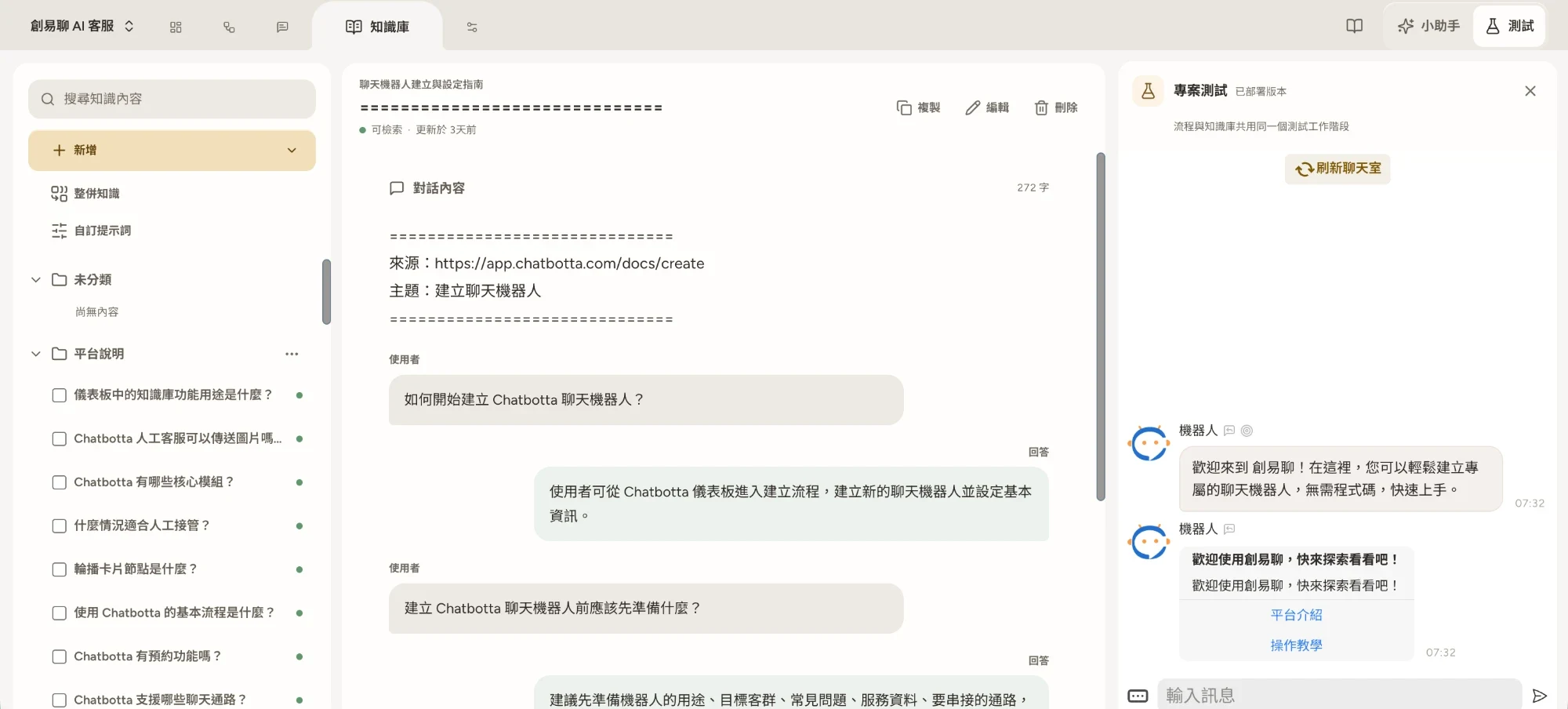
The AI knowledge base works like this: you organize and upload your content (PDF, DOCX or a pasted web page, which the system turns into Q&As), and the AI understands all the casual ways guests ask. The content most worth adding first for lodging:
| Type | What to prepare | Common guest questions |
|---|---|---|
| Rooms and facilities | Guests per room type, bed types, bathrooms, bathtub/balcony or not | “What does the 4-person room look like?” “Is there a bathtub?” |
| Check-in and check-out | Check-in/check-out times, rules for early luggage drop-off | “What time can we check in?” “Can we check out late?” |
| Getting there and parking | Address, driving directions, station pick-up, parking spaces | “Is there parking?” “Do you pick up from the train station?” |
| Policies | Pets, extra beds, cribs, cancellation rules | “Can we bring our dog?” “How much is an extra bed for a child?” |
| Nearby and local tips | Sights, food, itinerary ideas, Wi-Fi details | “What’s fun around here?” “What’s the Wi-Fi password?” |
Local tips are a B&B’s hidden edge: write down the insider itineraries you usually share with guests and add them to the knowledge base, and the AI can be your local guide even in the middle of the night. After launch, use “Times used” in Knowledge to see which questions get poor answers, and keep adding content.
Setup: build your lodging concierge in four steps
- Connect your LINE Official Account: follow the LINE auto-reply guide to set up the Messaging API, then paste the Channel access token into Chatbotta to connect.
- Upload room descriptions and check-in information: put the content from the table above into documents and upload them to the AI knowledge base, then ask all your common questions once in the test chat and make sure the answers are right before going live.
- Guide booking questions with the flow designer: design a welcome message and a button menu (view rooms / booking question / directions). For “booking question”, use buttons to collect the check-in date, number of nights, number of guests and room preference step by step, so the details reach you neatly and you only need to check availability and reply. You can also ask the built-in Copilot to lay out the flow for you. To let the AI book directly, use the built-in booking system’s lodging mode instead: once you set room types and how many rooms are available each night, the AI checks availability, quotes prices and completes the booking itself.
- Keep a way to reach a person: for special requests such as price negotiation, booking the whole property or honeymoon decorations, let guests reach a person with one tap; you take over in the unified inbox and return the chat to the bot when you’re done.
Automatic pre-arrival reminders: fewer last-minute surprises
Once a booking is confirmed, you can use the chat booking module to schedule automatic reminders before check-in: send the address and directions, check-in time, and parking and pick-up details in advance. Guests don’t have to scroll back through the chat, and you get far fewer “How do we get there?” calls on the day. Guests who want to cancel or reschedule also tell you sooner because of the reminder, giving you time to release the room.
5 things to check when choosing AI customer service for lodging
When booking messages pile up and you’re looking for an AI customer service system, filter with these five questions first. It works better than comparing feature lists:
- It should answer wherever guests ask: can messages from LINE, your website’s booking page, Messenger and Instagram share one knowledge base and land in one inbox?
- Can it check availability and book directly? An AI that only answers questions still leaves you going back and forth on “Is that date available?” It only really saves time if it can check availability, quote and book, or connect to your PMS
- What happens when it’s wrong or can’t answer? Is there a check before replies are sent, and can it hand off to you and let the guest know, so no one is left waiting in the middle of the night?
- How is it priced across seasons? By number of friends, by number of messages, or by conversations the AI actually answers? Can you switch to a smaller plan in the low season, and is there an annual contract?
- How much effort does it take to set up? Is the interface in Traditional Chinese, will someone help you organize your knowledge base, and how soon can you go live? A host can’t stop housekeeping to learn a new system
How Chatbotta handles each of these five points is covered in AI customer service for hospitality.
Get started
Go to app.chatbotta.com to build your lodging customer service bot. The free trial lasts 14 days, with someone from our team helping you get set up and go live, and it can be extended depending on your progress. For what LINE Official Account itself costs in Taiwan, see LINE Official Account pricing; for an overview of all features, see LINE AI customer service.
FAQ
Q: Is LINE auto-reply worth it for a B&B run by one or two people?
A: The smaller your team, the better the fit. Lodging questions are highly repetitive (room types, check-in times, getting there, pet policies). Let the AI knowledge base answer them automatically, and the host only handles messages that really need a person, such as price negotiation and special requests. Nothing gets missed late at night or while you’re cleaning rooms.
Q: Can the bot book rooms for guests directly?
A: Yes. B&Bs without a PMS can use the lodging mode of Chatbotta’s built-in booking system to set room types and how many rooms are open for direct booking each night. The AI checks availability, quotes the total and books right in the chat, and can also change dates or cancel for guests; bookings that need confirmation go to pending first. Chatbotta already connects with PMSs such as Cloudbeds and Mews, so the AI can look up availability and reservations in real time to answer guests; if you use a different PMS, we’ll build the integration for free. Changes involving payments, combining rooms or refunds are still best handed to a person.
Q: Do I need to code to set up LINE auto-replies for my property?
A: No. Issue a Channel access token for the LINE Messaging API and paste it into Chatbotta, upload your room descriptions and check-in information to the knowledge base, then design guiding buttons with visual flows or Copilot. No code at any point.