
How to cut LINE broadcast costs: 3 ways to lower your Official Account message fees
Your friend count is growing, but so is your LINE Official Account bill—a pain many shops share. In most cases, push costs rise not because you use too much, but because you use it the wrong way. This article gives you three proven ways to bring message fees down, and the results usually go beyond savings: messages become more relevant, and customers are less likely to block you. The plans and prices mentioned here are for LINE Official Account in Taiwan; they differ from those in other countries such as Japan.
Why the bill keeps growing: broadcasting to everyone
LINE’s billing logic is: push messages you send on your own (broadcast/push) are billed; replies to messages customers send you are not. For each broadcast, the message count is “friends who receive it × 1”—with 2,000 friends and four broadcasts a month, that is 8,000 messages. A growing friend count is good, but if every message goes to everyone, your costs grow linearly with your friends, while most of them aren’t interested in that message at all.
Method 1: Segmented pushes, sent only to the right people
Tag your friends and choose only the relevant audience when you push. For example, a guesthouse can split its friends into “past guests,” “asked but never stayed,” and “weekday guests,” and send its weekday vacancy deals only to weekday guests. If weekday guests make up 40%, that push uses 60% fewer messages, and gets a higher open rate too.
Here’s how to put it into practice:
- In Chatbotta’s unified inbox, tag each customer (purchase type, source, VIP, and so on)
- You can also design interactions in the flow designer so customers pick their interests and the flow tags them automatically
- When you push, filter recipients by tag instead of broadcasting to everyone
Method 2: Turn “announcement pushes” into “let customers ask”
Look back at your past pushes: how many were announcements? Changes to opening hours, campaign rules, pickup rules, FAQ explanations— this kind of information doesn’t need to go to everyone; customers who need it will ask. And when customers ask and a bot replies, it costs you nothing.
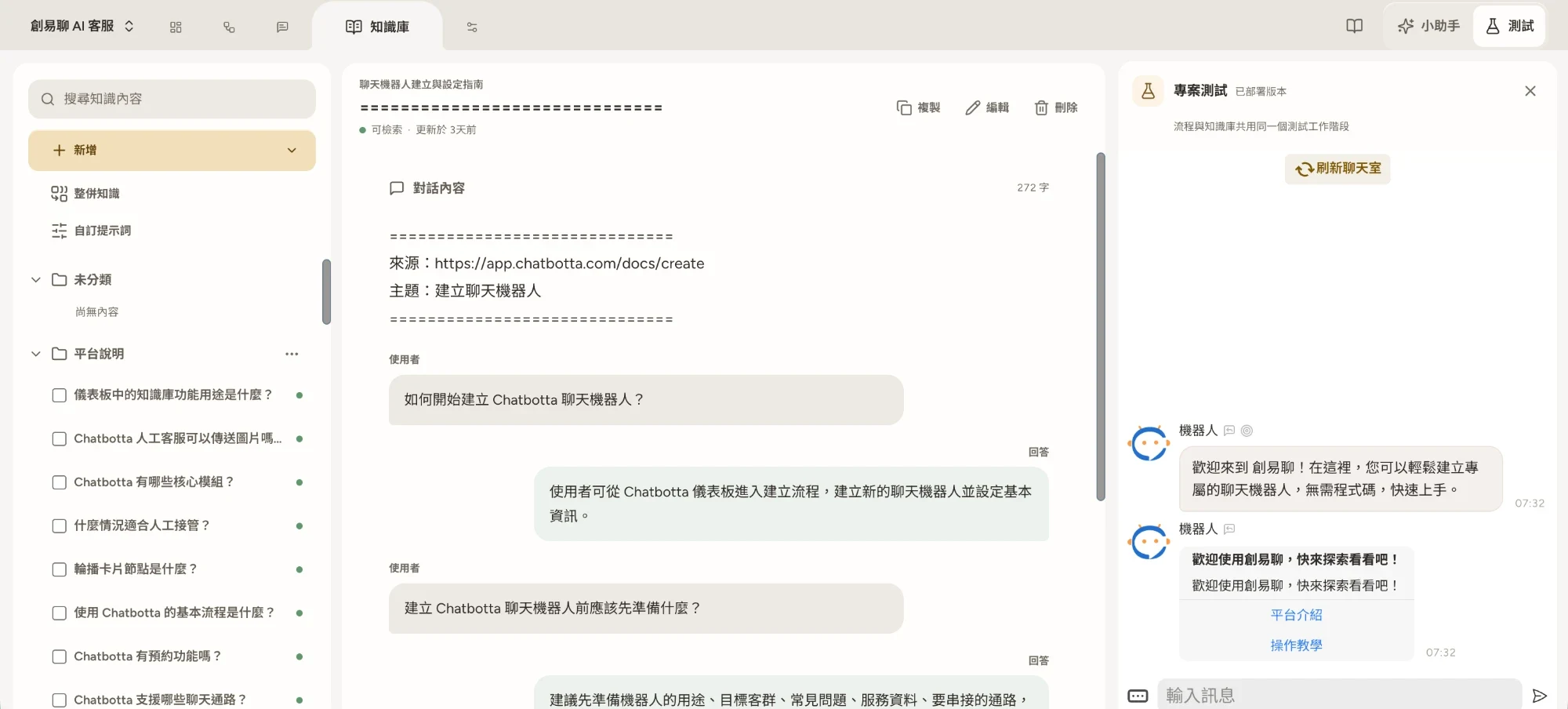
It’s simple: upload your price lists, rules, and announcements to the AI knowledge base (PDF, DOCX, and web pages are converted into Q&A automatically). Whether a customer asks “Are you open over Lunar New Year?” or “Are you open on the third day of the new year?”, the AI matches both to the same piece of knowledge. Combine this with a complete auto-reply setup, and you’ll find fewer and fewer reasons to push—saving your valuable push quota for promotions that actually bring in revenue.
Method 3: Choose the right plan and timing
LINE Official Account in Taiwan has three plans: Light (NT$0/month with 200 messages), Medium (NT$1,000/month from November 1 with 3,000 messages, no extra messages), and Heavy (NT$1,400/month from November 1 with 6,000 messages, extra messages available). With the wrong plan, you either overpay the monthly fee or run out of quota halfway through a push. Estimate your message count with “friends × pushes per month” and compare it with the plans. For the full comparison table and scenario estimates, see LINE Official Account pricing explained (LINE’s official announcements are the final word on actual fees).
Two timing tips:
- Combine messages—bundle two or three items into one push instead of sending three separate ones, cutting your message count to a third
- Review your quota at the end of the month—the Medium plan doesn’t allow extra messages, so save your quota for your most important campaigns instead of spending it on small things early in the month
Do all three with Chatbotta
All three methods rest on a system that can “tag + auto-reply.” Chatbotta is a no-code platform: paste your LINE Channel Access Token to connect your Official Account, tag customers in the unified inbox for segmentation, and use the AI knowledge base to turn announcements into non-billed auto-replies. You can also connect Facebook, Instagram, and website chat, managing every message in one inbox.
Start for free (14-day free trial with hands-on onboarding help, extendable depending on your progress), or ask about features on LINE. You’re also welcome to book a free product demo, and we can help you see how much more you could save on your current pushes.
FAQ
Q: Why does my LINE Official Account bill keep growing?
A: The most common cause is broadcasting to everyone: every broadcast counts as number of friends × 1 messages, so the more friends you have and the more often you send, the higher the bill. Switching to segmented pushes and letting auto-replies handle announcement-style content usually lowers your message count noticeably.
Q: Do bot auto-replies to customers increase message fees?
A: No. LINE bills the push messages a business sends on its own; replies sent through the Messaging API to messages customers send you do not count toward your quota. So the better your auto-replies, the less you need pushes to get information across, and the more you save on message fees. LINE’s official announcements are the final word on billing rules.
Q: How much friend data do I need before segmented pushes work?
A: You don’t need to wait for lots of data. Start with the simplest tags, such as “asked about a product,” “visited the store,” or “VIP,” and tag customers as you interact with them. Within a few weeks you can build meaningful segments. The earlier you start, the more you save.